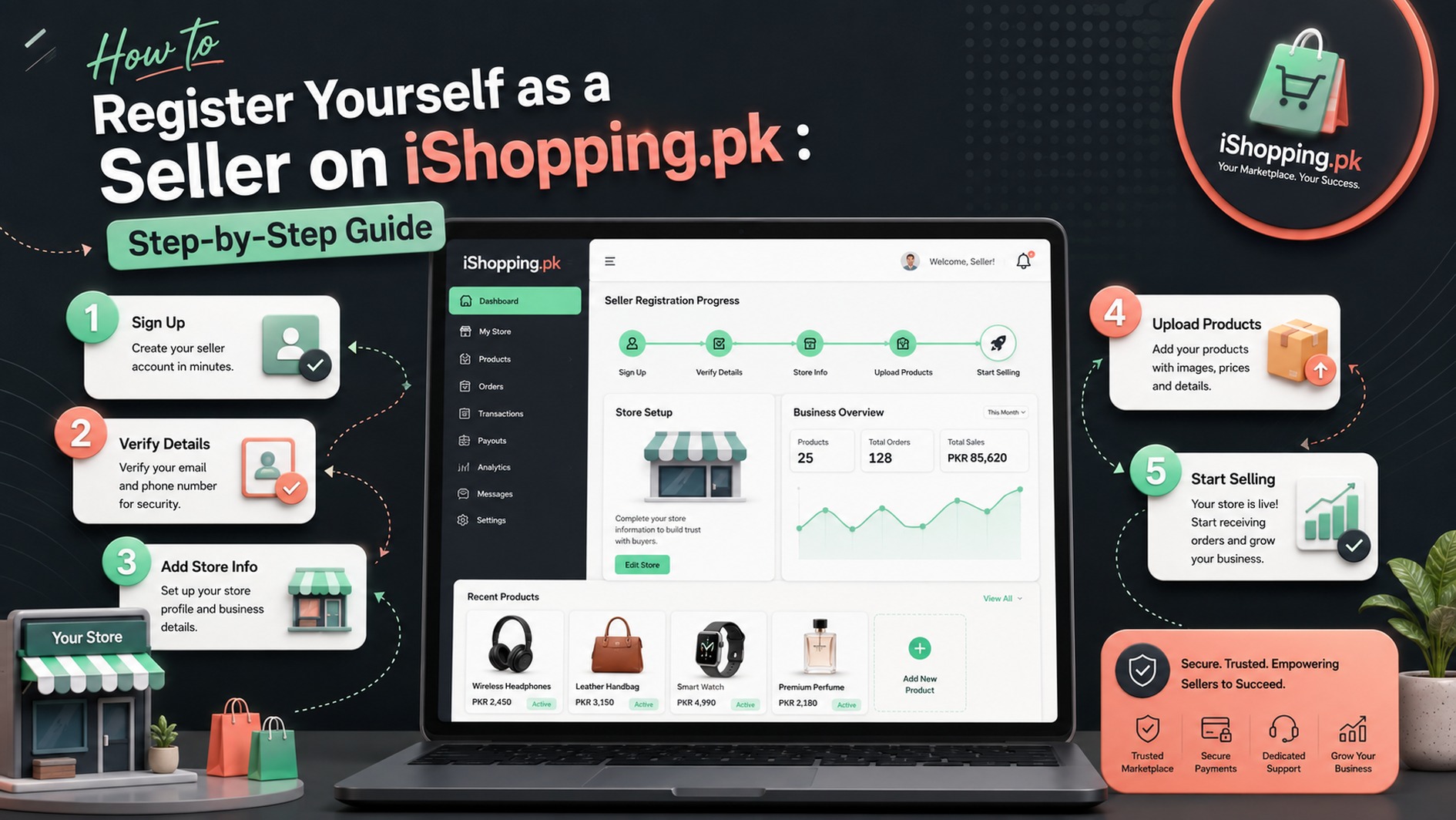
Selling online has become one of the easiest ways to grow a business, and iShopping.pk allows sellers to reach customers across Pakistan. Whether you own a small business, run a home-based store, or already have an established brand, becoming an iShopping.pk seller is a simple process.
This guide explains every step of the seller registration process in detail. By following these instructions carefully and providing accurate information, you can complete your registration without confusion. Once you submit your application successfully, the iShopping.pk team will review your details, and you will receive an approval email within 2 working days.
Step 1: Create Your Seller Account
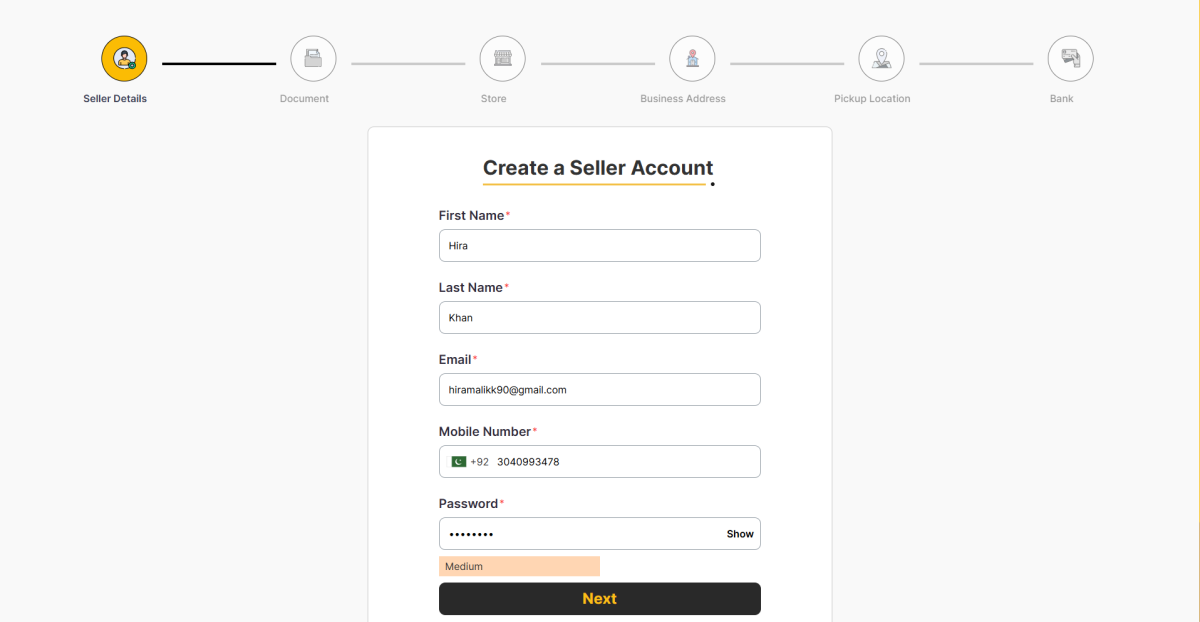
The first step is creating your seller account by entering your personal information. These details help iShopping.pk create your seller profile and allow the team to contact you throughout the registration process.
Fill in the following fields:
First Name
Enter your first name exactly as it appears on your CNIC.
Last Name
Provide your last name correctly to match your legal documents.
Email Address
Use an active email address because all future communication, including account approval, notifications, and important updates, will be sent to this email.
Mobile Number
Enter your working mobile number with the correct country code. This number may be used for account verification and seller communication.
Password
Create a strong password using a combination of uppercase letters, lowercase letters, numbers, and special characters. A secure password helps protect your seller account.
After completing all required fields, click Next to continue.
Step 2: Upload Your Legal Information
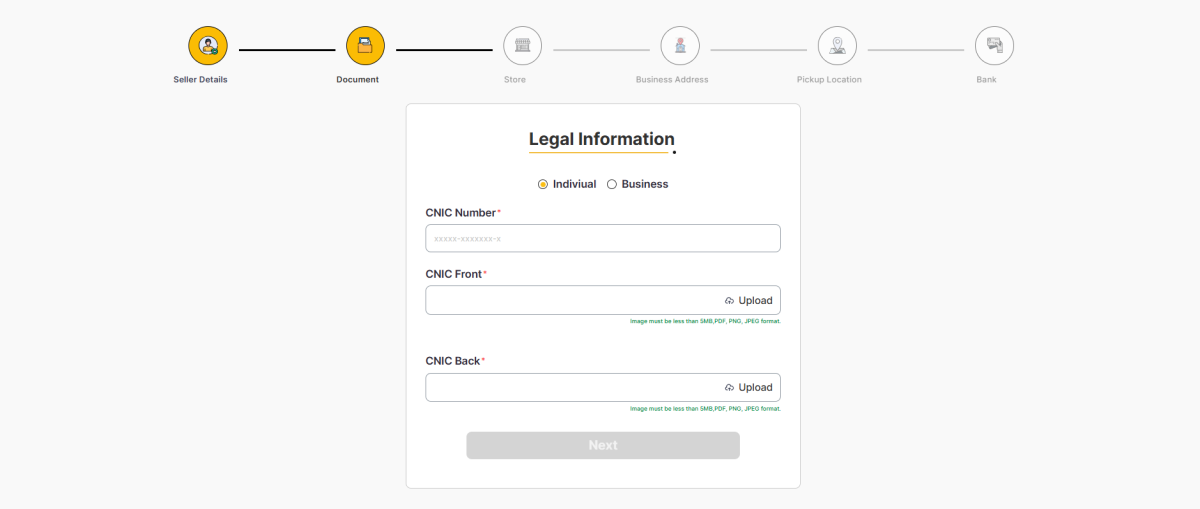
This step is about providing the legal information needed for your seller registration. First, select whether you are registering as an Individual or a Business. The information and documents required will depend on the option you choose.
If You Are Registering as an Individual
Select Individual if you are signing up as a personal seller rather than registering a company or business.
You will need to provide the following information:
CNIC Number
Enter your complete CNIC number in the required format.
CNIC Front
Upload a clear image of the front side of your CNIC.
CNIC Back
Upload a clear image of the back side of your CNIC.
Make sure the CNIC images are clear and all the details can be read easily. The uploaded file should be less than 5 MB and in one of the supported formats, such as PDF, PNG, or JPEG.
Step 2.1: If You Are Registering as a Business
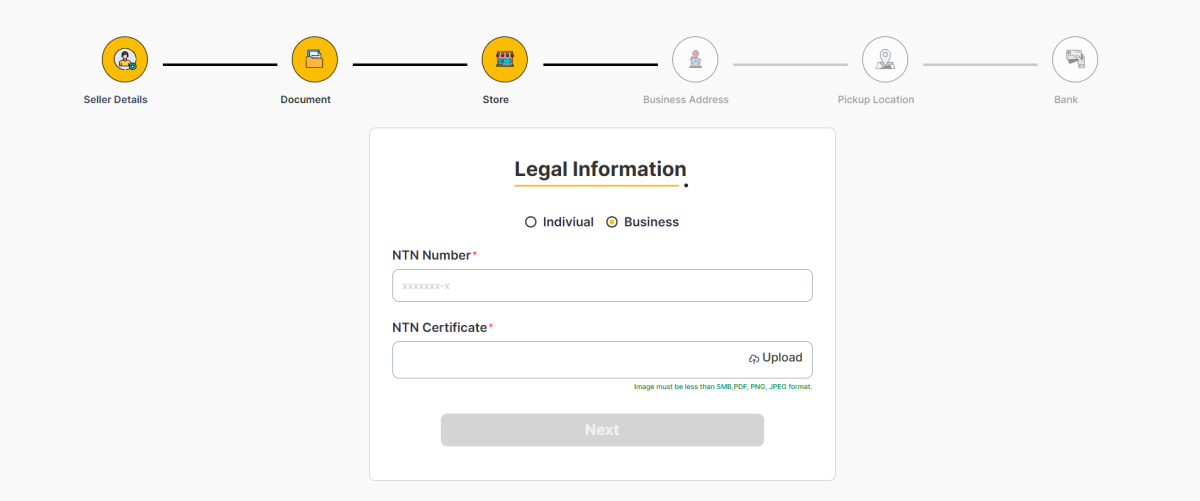
Select Business if you are registering as a company or an established business.
For business seller registration, you will need to provide the following information and documents:
NTN Number
Enter your valid National Tax Number (NTN) in the required field. Make sure the NTN number you enter is correct and matches your official business records.
NTN Certificate
Upload a clear copy of your NTN Certificate. Make sure the complete document is visible, readable, and all important information can be easily seen.
The uploaded file should be less than 5 MB and in one of the supported formats, such as PDF, PNG, or JPEG.
Once you have entered the NTN Number and uploaded the NTN Certificate, carefully review all the information and documents you have provided. Make sure there are no errors or missing details. After checking everything, click Next to continue with the seller registration process.
Step 3: Enter Your Store Details
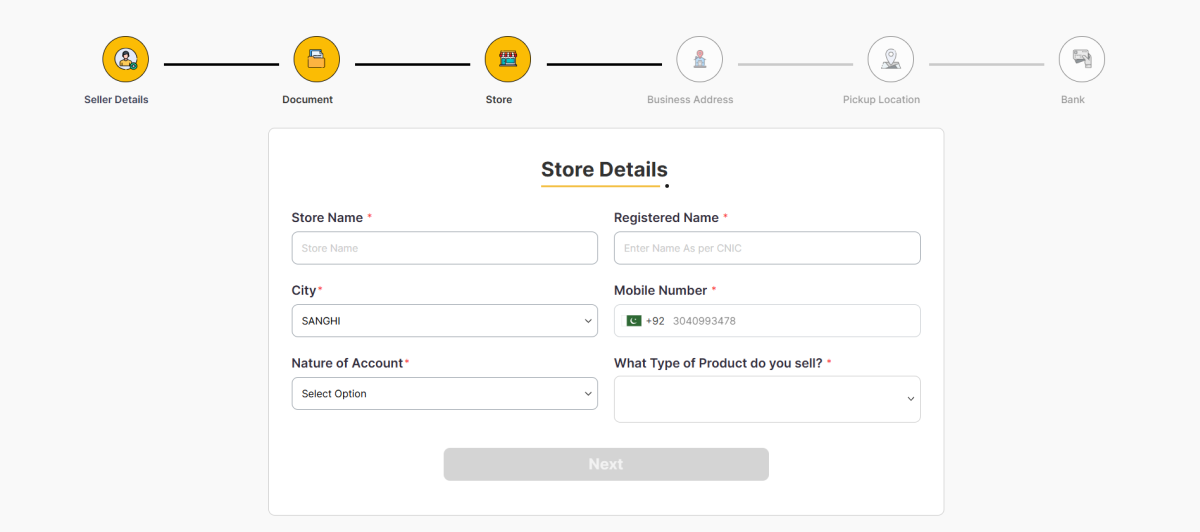
Now it’s time to create your store profile. These details will help customers identify your business on iShopping.pk.
Complete the following sections carefully.
Store Name
Enter the name you want customers to see on iShopping.pk.
Registered Name
Provide your legal name exactly as it appears on your CNIC.
City
Select the city where your business operates.
Mobile Number
Confirm the contact number associated with your store.
Nature of Account
Select the option that best describes your business type.
What Type of Product Do You Sell?
Choose the product category that best matches your inventory. Selecting the correct category helps organize your products properly on the marketplace.
After completing all fields, click Next.
Step 4: Add Your Business Address
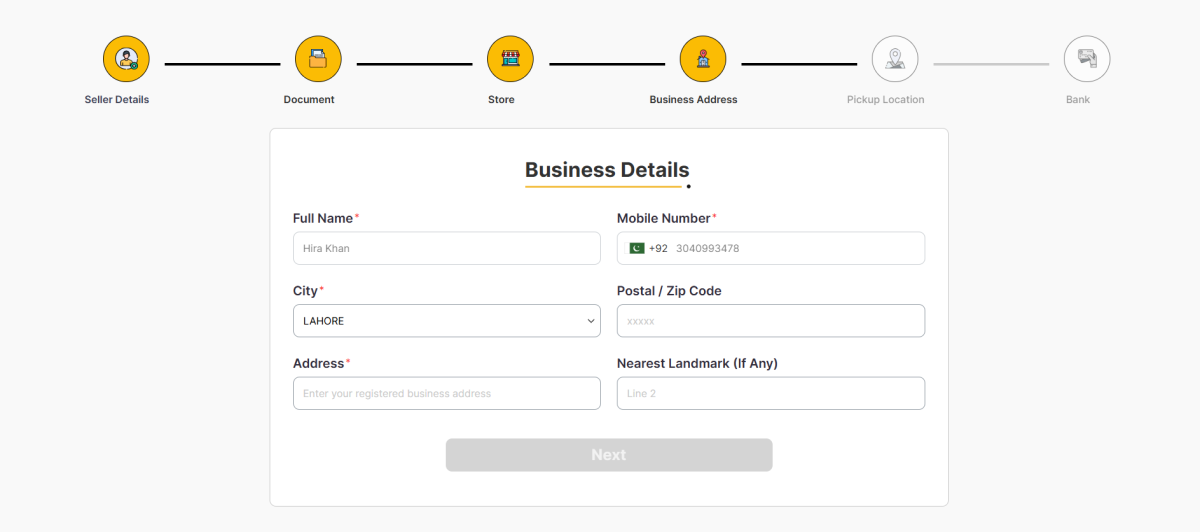
The next step is providing your official business address. This information helps iShopping.pk maintain accurate seller records.
Fill in each section carefully.
Full Name
Enter the full name of the business owner or authorized representative.
Mobile Number
Provide your business contact number.
City
Select the city where your business is located.
Postal or Zip Code
Enter the correct postal or ZIP code for your area.
Address
Provide your complete business address, including street, building number, office number, or any other relevant information.
Nearest Landmark
If available, add a nearby landmark that makes your business location easier to identify.
After reviewing your information, click Next.
Step 5: Enter Pickup Location Details
Your pickup location is where courier partners will collect your orders after customers place them.
Complete the following fields.
Contact Person
Enter the name of the person responsible for handing over shipments.
Mobile Number
Provide the primary contact number for pickup coordination.
Secondary Contact Number
You may enter an additional contact number as a backup.
Pickup Address
Enter the complete address from where orders will be picked up.
Work Address or Home Address
Select the appropriate pickup location based on where your inventory is stored.
Nearest Landmark
Adding a nearby landmark helps delivery partners locate your pickup point more easily.
Once everything is complete, click Next.
Step 6: Add Your Bank Details
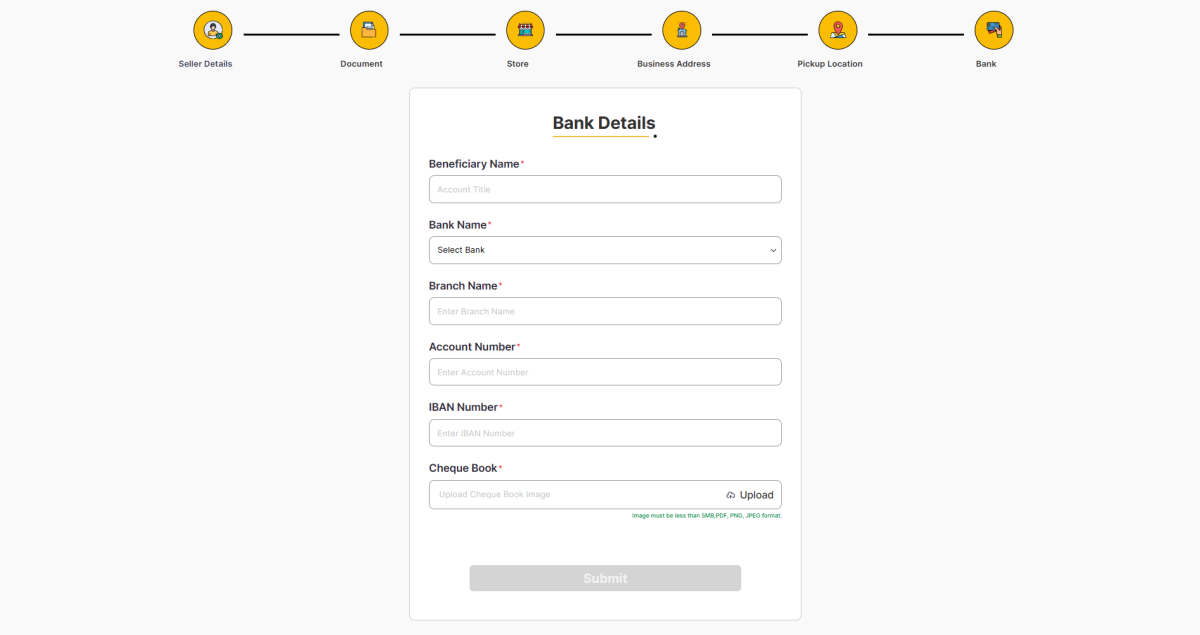
The final step is adding your banking information. This enables iShopping.pk to transfer your sales payments securely.
Complete every field carefully.
Beneficiary Name
Enter the account holder’s name exactly as it appears in your bank records.
Bank Name
Select your bank from the available list.
Branch Name
Enter the name of your bank branch.
Account Number
Provide your correct bank account number.
IBAN Number
Enter your complete IBAN without mistakes to avoid payment issues.
Cheque Book Image
Upload a clear image of your chequebook or any document requested for account verification. Ensure the file is under 5 MB and in PDF, PNG, or JPEG format.
After reviewing all information, click Submit to complete your registration.
What Happens After Submission?
After you click Submit, your registration request is sent to the iShopping team for review. They check the details you entered, including your documents, business information, and bank details, to make sure everything is correct. If any information is missing or unclear, you may be contacted for clarification.
When your application meets all the requirements, you will receive an approval email within 2 working days. After that, you can sign in to your seller account, add your products, manage orders, and start selling on iShopping.
Tips for a Smooth Registration
Before submitting your application, keep these simple points in mind:
- Use the same name and CNIC details that appear on your official documents.
- Make sure your email address and mobile number are active and entered correctly.
- Upload clear images of all required documents so they can be verified easily.
- Check your bank account and IBAN details carefully to prevent payment issues later.
- Take a final look at every section before clicking Submit to avoid unnecessary delays.
Final Thoughts
Registering as a seller on iShopping.pk is a simple process when you provide the right information and complete each section carefully. From creating your seller account to submitting your banking details, every step plays an important role in verifying your business and preparing your store for online selling.
Once your application is approved within 2 working days, you’ll be ready to list your products, reach customers across Pakistan, and grow your business through the iShopping.pk marketplace.